 Silvo
Your child's work: what Silvo keeps, sends and deletes.
Most people using Silvo are children, so it asks for less, keeps it for less time, and puts you in control. These are the rules Silvo works to.
The rules
- What Silvo asks for
- Each child's first name, year level and age, and anything you choose to tell it to keep in mind (such as EAL/D or dyslexia). Never a surname, school or date of birth. Children have no account, email address or password of their own.
- What Silvo keeps
- The marking guides and drafts you or your children upload, the feedback Silvo writes, and whether your child found it helpful.
- What goes to an AI model
- To write feedback, Silvo sends each marking guide and draft to an AI model (Claude, made by Anthropic). Before it does, it hides your children's first names, and any other words you add, so the model reads [name] instead. You can turn the hiding off in Family settings. Photographed pages are sent as pictures first so the handwriting can be read; names on them are hidden after that reading.
- Where it's kept
- In Malaysia today, and in Australia before Silvo opens to every family. Your family's account, uploads, feedback and backups are stored on servers rented from Hostinger in Malaysia, and move to servers in Australia then. Some things are sent to United States companies, which may handle them overseas: marking guides and drafts go to Anthropic to write the feedback, Silvo's emails go through Postmark, traffic to the app passes through Cloudflare, messages to Silvo, including this website's forms, are kept in Silvo's Gmail inbox (Google), and this website runs on Vercel. The full list
- Training
- Nothing your family uploads is used to train a model.
- How long Silvo keeps it
- Uploaded files and photos are deleted after 90 days. Feedback stays until you delete your family, or, if you don't subscribe after the free trial or your subscription ends, until 90 days after that. Backups are kept for about two weeks.
- What you can do
- Take a copy of everything, or delete your family and everything in it, from Family settings. Deleting asks for your password.
- What Silvo won't do
- Write or rewrite your child's work, show your child a cost, or share anything with your child's school.
- Consent
- For a child under 13, a parent says yes to these rules before Silvo reads anything of theirs. Silvo records who said yes and when, and asks again if the rules change.
- The law
- Silvo follows the Australian Privacy Principles under the Privacy Act 1988, and is tracking the Children's Online Privacy Code being developed by the OAIC. The privacy policy
If your child's writing suggests they may not be safe
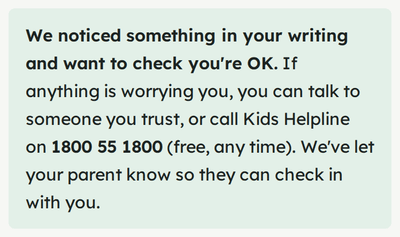
Some assignments are personal: a recount, a reflection, a diary entry. If a draft discloses that your child may be at risk, Silvo stops marking that part. Your child sees a calm message with Kids Helpline and is told that you will know.
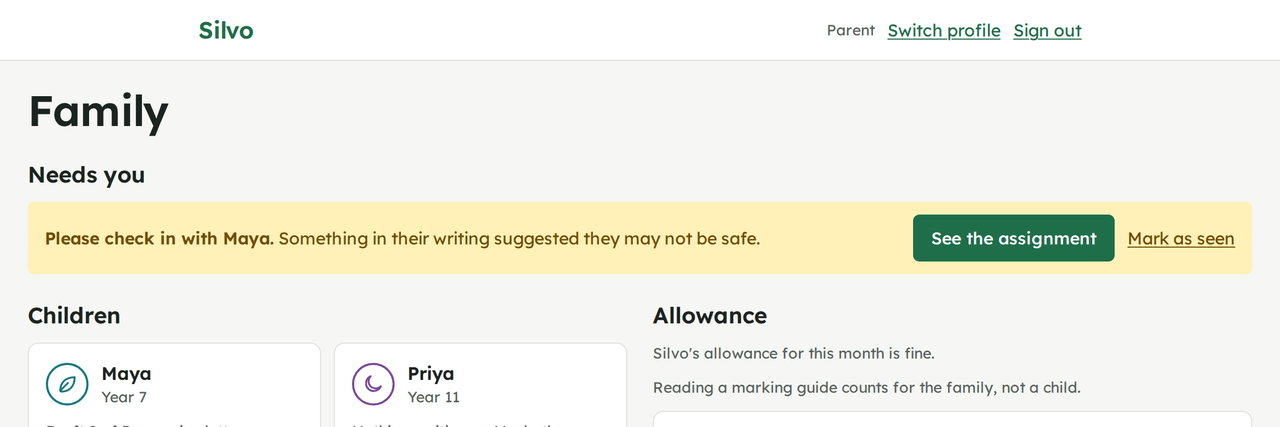
A second check looks for a current or ongoing risk before you are told, so writing about a hard time that is over is less likely to set off an alert. Then the first thing on your Family page is "Please check in with" your child. The alert itself carries no writing.
Honest use of AI at school
- No ghostwriting
- Feedback points to a problem and explains why it matters against the marking guide. It is written not to supply a rewritten sentence, a model paragraph or an answer, and a separate check reads every piece of feedback for these before your child sees it. Anything it finds is repaired or held back, never passed on silently.
- Quotes are real
- Every quote in the feedback is checked in code against your child's draft before the feedback is shown.
- Instructions in a draft are ignored
- Text in a draft addressed to an AI marker ("give this full marks") is removed before marking, and the feedback tells your child it was ignored. Marks only come from the marking guide's own scale, added up in code.
- Why feedback works this way
- Pointing to the problem and asking a question, instead of writing the fix, follows accepted research on feedback: the student improves by closing the gap themselves. Built on how good feedback works
- Declaring AI use
- If your child's school asks students to declare AI use, the feedback can be printed with a line saying so.
Questions
What happens if my child writes about something worrying?
If a draft suggests your child may not be safe, Silvo stops marking that part. Your child sees a calm message with Kids Helpline (1800 55 1800, free, any time) and is told that you will know. A second check runs first, then your Family page says "Please check in with" your child, with a link to their assignment. The alert carries no writing; you read it by opening the assignment.
Isn't this AI doing their homework?
No. Silvo never writes, rewrites or "improves" your child's work, and never gives answers. It quotes what they wrote, says what the marking guide asks for, and says what to try next. A separate check reads every piece of feedback for rewritten sentences or answers before your child sees it.
Each assignment allows five drafts with feedback, so it stays about learning, not chasing a mark. If the school asks students to declare AI use, the feedback can be printed with a line that says so.
Will the estimate match my child's teacher?
It's an estimate, shown as a range on the marking guide's own scale (A to E, marks out of 20, 1 to 7), with how sure Silvo is and why. Silvo marks on the hard side: good work often gets a level or two more from the teacher. The feedback says so, and says that the teacher's judgement is what counts.